Knolbar Led Display's Remote Control Explanation
Remote control of the Knolbar Led Display can be used to program the Led Display Board.
PROG key is be used to start the programming session.
EXIT key is used to end the program session.
SHIFT key is used to toggle between the input of shift (red) characters or the normal charcters.
BKSP key is used to erase the last charcter.
MODE key is used to select the following different modes of the display:
- Mode 0 - Normal Scroll Mode
- Mode 1 - Stop Mode
- Mode 2 - Blinkibng Mode
- Mode 3 - Typing Mode
- Mode 4 - Falling Mode
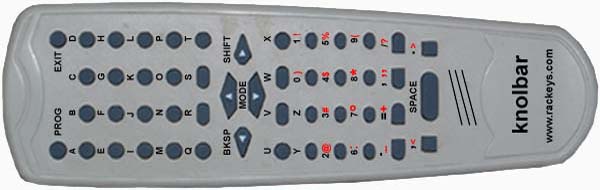
Key details of the Knolbar Led Display Remote Control:
Alphabets: A B C D E F G H I J K L M N O P Q R S T U V W X Y Z
Numerals: 0 1 2 3 4 5 6 7 8 9
Symbols: ) ! @ # $% : ° * ( _ + " ? < >